Can You Set Up Shopify MCP Yourself? A Complete DIY Guide (2026)
Short Answer: Yes—but whether you should depends on your technical experience, your available time, and how critical AI automation is to your Shopify business.
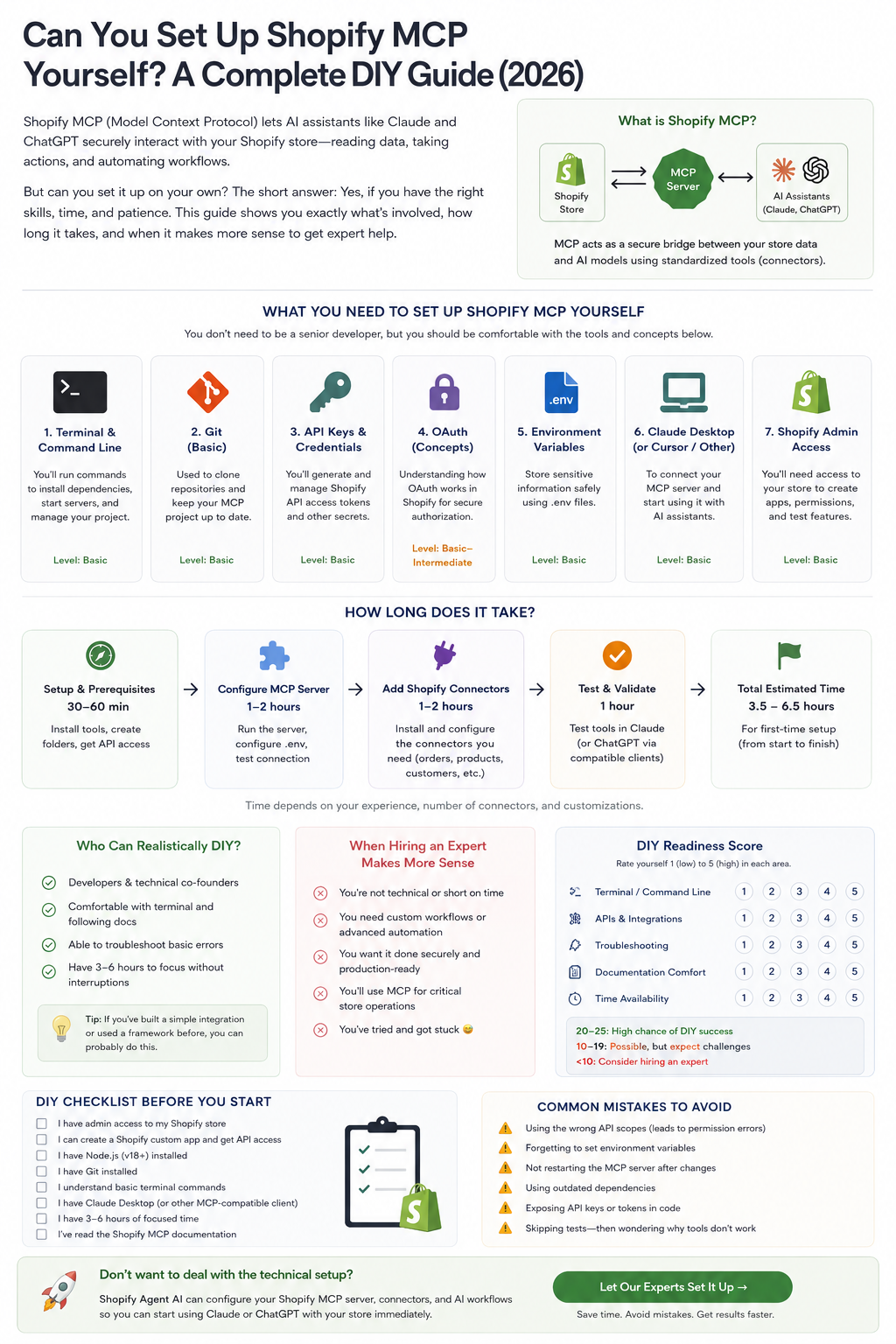
For many Shopify merchants, installing a Shopify MCP (Model Context Protocol) server is the first step toward giving AI assistants like Claude, ChatGPT, and other MCP-compatible clients secure access to store data. Once configured correctly, these AI agents can answer questions about products, customers, inventory, and orders while even assisting with day-to-day ecommerce workflows.
The challenge is that Shopify MCP isn't installed like a traditional Shopify app. It requires configuring a server, authenticating APIs, managing connectors, and understanding how AI tools communicate with your store.
This guide walks you through everything involved so you can decide whether a DIY setup makes sense—or whether hiring an expert will save you valuable time.
What Is Shopify MCP?
The Model Context Protocol (MCP) is an open standard that allows AI assistants to securely communicate with external systems like Shopify.
Instead of manually copying information into ChatGPT or Claude, an MCP server acts as a secure bridge between your Shopify store and your AI assistant.
Once connected, AI can:
- Read product catalogs
- Search customer information
- Review inventory
- Analyze orders
- Generate reports
- Assist with merchandising
- Help troubleshoot store issues
- Automate repetitive workflows
Think of it as giving your AI assistant controlled, permission-based access to your Shopify business instead of relying on manual prompts.
For a deeper technical overview of how MCP architecture works, see our guide on Shopify MCP Server Explained.
Can You Actually Do It Yourself?
Absolutely.
But success depends on your background.
If you've worked with:
- Git
- APIs
- Command Line
- Environment Variables
- Developer Documentation
you'll likely find Shopify MCP very manageable.
If you've never opened Terminal before, expect a much steeper learning curve.
Skills You'll Need
The biggest misconception is that Shopify MCP requires advanced software engineering.
It doesn't.
However, you should feel comfortable with several technical concepts.
| Skill | Difficulty | Why It Matters |
|---|---|---|
| Terminal / Command Line | ⭐⭐☆☆☆ | Running the MCP server |
| Git | ⭐⭐☆☆☆ | Downloading and updating repositories |
| Shopify Admin | ⭐☆☆☆☆ | Creating apps and permissions |
| API Keys | ⭐⭐☆☆☆ | Authenticating your store |
| OAuth Concepts | ⭐⭐⭐☆☆ | Secure authorization |
| Environment Variables (.env) | ⭐⭐☆☆☆ | Storing credentials safely |
| Documentation | ⭐⭐⭐☆☆ | Troubleshooting setup issues |
DIY Setup vs Professional Setup
One of the most common questions merchants ask is whether to handle MCP installation themselves or hire a specialist. Here's a detailed comparison:
| Factor | DIY Setup | Professional Setup |
|---|---|---|
| Cost | Free (your time only) | Starting at $300–$500 |
| Time Investment | 3.5–6.5 hours (first time) | 1–2 hours (done for you) |
| Technical Knowledge Required | Moderate (APIs, CLI, Git) | None |
| Risk of Misconfiguration | Higher — common for beginners | Very low — experienced installers |
| Troubleshooting | Self-directed (documentation, forums) | Included in service |
| Custom Workflows | Limited to your expertise | Tailored to business needs |
| Ongoing Support | Self-managed | Often includes maintenance period |
| Security Best Practices | Must research independently | Built into professional process |
| Multi-Connector Setup | Each adds complexity | Handled as part of package |
| Speed to Production | Days to weeks | Same day or next day |
| Best For | Technical merchants, developers, learners | Revenue-focused merchants, agencies, enterprises |
Bottom line: If your hourly rate exceeds $50/hour and you value speed to production, professional setup typically delivers better ROI. If you enjoy technical learning and have flexible timelines, DIY is a rewarding path.
For step-by-step technical instructions, see our Shopify MCP Installation Guide.
What You'll Need Before Starting
Before touching Shopify MCP, gather everything below.
Shopify Store
You'll need:
- Shopify Admin access
- Permission to create Custom Apps
- API credentials
Node.js
Most Shopify MCP servers run on Node.js.
Verify it's installed:
node -vIf you receive a version number, you're ready.
Git
Git downloads the project.
git clone ...You don't need to master Git—only the basics.
Claude Desktop (or another MCP-compatible client)
Most users begin with Claude Desktop because it already supports MCP connections. For a detailed comparison of AI clients, see Claude vs ChatGPT for Shopify MCP.
Other AI clients are increasingly adding MCP compatibility as adoption grows.
Code Editor
Most tutorials use:
- VS Code
- Cursor
- Windsurf
Any modern editor works.
How Long Does Setup Take?
For most first-time users:
| Task | Estimated Time |
|---|---|
| Installing tools | 30–60 minutes |
| Creating Shopify app | 20–30 minutes |
| Configuring API keys | 20 minutes |
| Setting environment variables | 15–30 minutes |
| Installing connectors | 1–2 hours |
| Testing & troubleshooting | 1–2 hours |
Typical total: 3.5–6.5 hours
If you've never worked with APIs before, don't be surprised if it takes longer.
Common DIY Challenges
Most setup problems aren't caused by Shopify.
They're caused by configuration mistakes.
The most common include:
Incorrect API scopes
Permissions determine what your AI assistant can access.
Missing scopes often produce confusing authorization errors.
Understanding which connectors your setup requires helps you configure the right scopes from the start.
Environment Variables
Many users accidentally:
- save the wrong API key
- miss quotation marks
- misname variables
- edit the wrong .env file
Tiny mistakes here can prevent the server from starting.
OAuth Authentication
OAuth isn't difficult—but it introduces another layer of configuration that many beginners haven't encountered.
Connector Configuration
Each MCP connector must be installed and configured individually.
Depending on your goals, you may connect:
- Products
- Orders
- Customers
- Inventory
- Collections
- Draft Orders
- Metafields
Every connector adds additional testing. For a complete breakdown of which connectors to prioritize, see Shopify MCP Required Connectors Explained.
Signs DIY Is Probably Right For You
You should seriously consider doing it yourself if:
✅ You enjoy learning technical tools
✅ You've worked with APIs before
✅ You don't mind reading documentation
✅ You have several uninterrupted hours
✅ Your store isn't business-critical during setup
When Hiring an Expert Makes More Sense
Professional setup usually pays for itself when:
- Your store generates significant revenue
- Downtime is expensive
- You need custom workflows
- You need multiple AI agents
- You want advanced automations
- You don't want to troubleshoot technical issues
Many businesses discover they spend more time debugging than they would have spent hiring someone who has completed dozens of installations. The time and cost savings of AI automation often justify professional implementation.
DIY Checklist
Before starting, confirm:
- ☐ Shopify Admin access
- ☐ Ability to create Custom Apps
- ☐ Node.js installed
- ☐ Git installed
- ☐ Code editor installed
- ☐ Claude Desktop (or compatible client)
- ☐ API credentials generated
- ☐ 4–6 hours available
- ☐ Comfortable using Terminal
- ☐ Willingness to troubleshoot documentation
If several of these items feel unfamiliar, professional setup may save you considerable frustration.
Frequently Asked Questions
Is Shopify MCP difficult to install?
Not necessarily. Developers and technically inclined users usually complete setup in a few hours. Beginners should expect a learning curve, particularly around APIs, environment variables, and authentication. Our Shopify MCP Installation Guide walks through each step in detail.
Do I need to know how to code?
Basic coding knowledge helps, but it's not always required. Following documentation, editing configuration files, and using command-line tools are often enough for a standard setup.
Can I break my Shopify store?
A properly configured Shopify MCP server primarily interacts through Shopify APIs and doesn't modify your storefront theme by default. However, granting unnecessary permissions or running automation without testing can create unintended issues, so it's best to work carefully and use development or test environments when possible.
How long does Shopify MCP take to set up?
Most first-time installations take between 3.5 and 6.5 hours, depending on your technical experience and the number of connectors you configure.
Can ChatGPT use Shopify MCP?
Yes. Any AI client that supports the Model Context Protocol can connect to a Shopify MCP server once it's configured correctly. Support continues to expand as more AI platforms adopt MCP. Learn more about how AI shopping agents discover products.
Is Claude better than ChatGPT for Shopify MCP?
Both can work well with MCP. The better choice depends on your workflow, preferred interface, and the level of MCP support available in your chosen client at the time of setup. See our detailed comparison for a full breakdown.
What happens if I get stuck during setup?
Most issues are solvable through documentation and community forums. Common problems include incorrect API scopes, environment variable typos, and OAuth configuration errors. If you've spent more than 2 hours troubleshooting a single issue, professional assistance is usually more cost-effective.
Do I need a separate server to run Shopify MCP?
For local development and personal use, MCP can run on your own computer. For production use with multiple team members or always-on availability, a cloud server or hosting service is recommended.
How much does professional Shopify MCP setup cost?
Professional installation typically starts at $300–$500 for basic setup, with more complex implementations (multiple connectors, custom workflows, team training) ranging higher. The investment often pays for itself within the first month through time savings.
Final Thoughts
Setting up Shopify MCP yourself is entirely possible, and for technically confident merchants it's an excellent way to understand how AI integrates with your business.
However, Shopify MCP is more than an installation. It's a complete AI integration layer that requires secure authentication, connector configuration, permissions management, and ongoing maintenance.
The good news is that once everything is configured correctly, your AI assistant becomes far more than a chatbot—it becomes an intelligent business tool capable of helping manage products, customers, inventory, reporting, and countless ecommerce workflows.
Whether you choose the DIY route or professional assistance, investing in Shopify MCP today positions your store for the next generation of AI-powered commerce. For merchants ready to optimize their store for AI search, MCP is a foundational building block.
Need Help Setting Up Shopify MCP?
At Shopify Agent AI, we help Shopify merchants move beyond basic AI prompts by building production-ready MCP environments tailored to their business.
Our services include:
- Shopify MCP installation
- Connector configuration
- Claude and ChatGPT integration
- AI workflow automation
- Secure API setup
- Testing and validation
- Ongoing optimization and support
If you'd rather spend your time growing your business than troubleshooting configuration files, we're here to help you get up and running quickly, securely, and with confidence.
Related Reading
What Is Shopify MCP? — Introductory overview of Model Context Protocol for Shopify merchants.
Shopify MCP Installation Guide (Step-by-Step Setup for 2026) — Detailed technical walkthrough for installing MCP.
Shopify MCP Required Connectors Explained (2026 Guide) — Which connectors to prioritize for your AI agent setup.
Shopify MCP Server Explained — Technical architecture and how MCP servers work.
Claude vs ChatGPT for Shopify MCP — Head-to-head comparison for ecommerce use cases.
The 12 Best Shopify AI Agents in 2026 — Comprehensive comparison of AI agents for Shopify.
How AI Shopping Agents Discover Shopify Products — Understanding AI product discovery mechanisms.
The Many Ways AI Agents Save Time and Money for Ecommerce — ROI breakdown of AI automation investments.
Frequently Asked Questions
Quick answers to common questions about this topic.
Not necessarily. Developers and technically inclined users usually complete setup in a few hours. Beginners should expect a learning curve, particularly around APIs, environment variables, and authentication. Our [Shopify MCP Installation Guide](/blog/shopify-mcp-installation-guide/) walks through each step in detail.
Basic coding knowledge helps, but it's not always required. Following documentation, editing configuration files, and using command-line tools are often enough for a standard setup.
A properly configured Shopify MCP server primarily interacts through Shopify APIs and doesn't modify your storefront theme by default. However, granting unnecessary permissions or running automation without testing can create unintended issues, so it's best to work carefully and use development or test environments when possible.
Most first-time installations take between **3.5 and 6.5 hours**, depending on your technical experience and the number of connectors you configure.
Yes. Any AI client that supports the Model Context Protocol can connect to a Shopify MCP server once it's configured correctly. Support continues to expand as more AI platforms adopt MCP. Learn more about [how AI shopping agents discover products](/blog/how-ai-shopping-agents-discover-shopify-products/).
Both can work well with MCP. The better choice depends on your workflow, preferred interface, and the level of MCP support available in your chosen client at the time of setup. See our [detailed comparison](/blog/claude-vs-chatgpt-shopify-mcp/) for a full breakdown.
Most issues are solvable through documentation and community forums. Common problems include incorrect API scopes, environment variable typos, and OAuth configuration errors. If you've spent more than 2 hours troubleshooting a single issue, professional assistance is usually more cost-effective.
For local development and personal use, MCP can run on your own computer. For production use with multiple team members or always-on availability, a cloud server or hosting service is recommended.
Professional installation typically starts at $300–$500 for basic setup, with more complex implementations (multiple connectors, custom workflows, team training) ranging higher. The investment often pays for itself within the first month through time savings.
Related Reading
What Is Shopify MCP? The New AI Layer That Could Change How Shopify Stores Operate
Learn what Shopify MCP (Model Context Protocol) is, how it works, and why it could transform how Shopify stores use AI agents for customer support, sales, and automation.
Read articleThe Shift from SEO to GEO: Why Generative Engine Optimization Is the Future of Ecommerce Visibility
Traditional SEO is losing ground to AI-powered search. Learn how Generative Engine Optimization (GEO) works, the technical implementation details including structured data and entity structuring, and why Shopify stores that don't adapt will become invisible.
Read articleClaude vs ChatGPT for Shopify MCP: Which AI Is Better for Ecommerce Automation?
Compare Claude and ChatGPT for Shopify MCP integrations. Detailed analysis of strengths, use cases, context windows, and why the future of ecommerce AI is multi-model.
Read articleReady to Optimize Your Store for AI?
Get a personalized AI readiness audit and discover how your Shopify store can leverage AI agents, MCP integrations, and automation to drive growth.